
Ortur OLM2 S2 Laser Engraving & Cutting Machine 5,000mm/min (10W/5W/1.6W)
Deeply loved by geek players. Due to the use of 12bit precision PWM control signal, more than 1000 grayscale performances give you real. Tilt Motion Detection: automatically stops laser when position deviates. USB Connection Monitor: automatically stops beam when disconnected. Laser Exposure Time Limit: no movement for long time, laser will be shut off . Voltage & Current safety control system.
Buy on Amazon #adAffiliate link — we may earn a commission.
Pros & cons
What we like
- Fast engraving speeds (listed up to 5,000 mm/min in the product title; the machine's firmware supports higher) make detailed jobs finish noticeably quicker than basic 2W-5W budget lasers
- Compressed-spot laser module produces fine, crisp detail on wood, leather and anodized metal
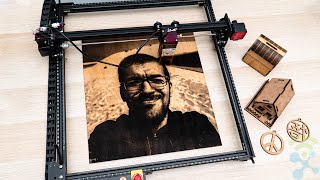
- Rigid aluminum-profile frame with a moving-gantry design is more stable than many entry-level kit lasers
- Runs on open-source/grbl-compatible software (LaserGRBL free, LightBurn paid optional), so there is no forced subscription or cloud lock-in
- Relatively quick to assemble and priced well below enclosed or larger-format diode lasers, making it an accessible step up from entry-level machines
What could be better
- Open-frame design with no built-in enclosure; you need laser safety glasses and ideally an added enclosure and ventilation, as smoke and fumes are not contained
- Real cutting ability is limited: the 10W version cuts roughly 8-10mm basswood in multiple passes and struggles with clear acrylic and thicker or denser material
- Manual focusing and no built-in air assist on some bundles (air assist is often a separate purchase) can cause flare-ups and charring when cutting
- Setup, grbl/LightBurn configuration and tuning have a learning curve for complete beginners, and documentation and support quality vary
Key features
Who is this for?
Best for
Hobbyists and small-scale makers who want a fast, fairly large-format laser for engraving wood, leather and coated metals without paying for a proprietary subscription. Also a good fit for users comfortable with some tinkering who want an upgradeable open-source ecosystem.
Not ideal for
Beginners who want a fully enclosed, plug-and-play, safety-focused machine, or anyone who needs reliable thick-material cutting or clear acrylic cutting. Not ideal for shared homes or classrooms without adding an enclosure and proper ventilation.
How it scores

Price history (estimated)
Specifications
| Power | Multiple configurations; 10W / 5W / 1.6W labeled in this listing (actual optical output is lower than the electrical rating) |
|---|---|
| Work Area | Approx. 400 x 400 mm |
| Software | LaserGRBL (free), LightBurn (paid, optional), compatible with other grbl-based software |
| Connectivity | USB (Type-C) to computer; TF/offline use depends on controller version |
| Laser Type | Diode laser, compressed-spot, 445nm blue |
| Speed | Up to 5,000 mm/min listed (higher speeds possible in firmware) |
| Weight | Approx. 3-5 kg (varies by configuration; verify on the product page) |
| Focus | Fixed/manual focus (adjust the module height manually) |
| Enclosure | Open frame, no enclosure included |
| Material Compatibility | Wood, plywood, MDF, leather, cardboard, paper, dark/opaque acrylic, anodized aluminum, coated metals, slate/stone marking; cannot cut clear/transparent acrylic or reflective metals |
Compatibility
Controlled through desktop software over USB. LaserGRBL is Windows-only; LightBurn supports Windows, macOS and Linux. There is no official iOS or Android app.